

How the Friendship Lamp Works: Setup, Features and Everything You Need to Know
Quick answer: Wondering how the Friendship Lamp works in the UK? Touch your lamp and, within seconds, your loved one's lamp — anywhere in the world — lights up in the same colour. No messages, no phone calls needed. Just a silent, instant signal that says: I'm thinking of you.

If someone you love lives far away — a partner at the other end of the country, a best friend who moved abroad, a mum you don't see nearly enough — you'll know that feeling of wanting to reach out but not wanting to interrupt their day. The LuvLink Friendship Lamp was built for exactly that moment. Here's how it all works.
How Does the Friendship Lamp Work?
The concept is beautifully simple. Each lamp connects to your home Wi-Fi. When you touch yours, it glows a colour — and every other lamp in your group lights up in that exact same colour, wherever they are. Your person sees it, and maybe touches theirs back. That's the whole loop.
There are no buttons to press, no apps to open, no notifications to swipe away. The touch is the message. One couple who use ours told us their ritual: she's in Bristol, her mum's in Edinburgh, and every morning at 8am the lamp on her kitchen shelf goes teal — which means her mum's had her morning cuppa and is thinking of her. No call required. Just teal.

The lamps stay linked as long as they're plugged in and connected to Wi-Fi. Your other half in Edinburgh and you in London, your daughter in Sydney and you in Bristol — the lamp doesn't care. It just works.
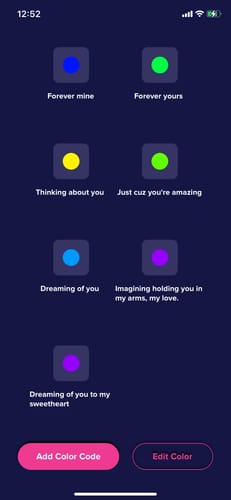
“Such an amazing lamp! It works from America to Australia. Setup was easy. I ordered one from Australia to be shipped to an Australian address. I ordered a second lamp from the manufacturer’s Amazon store in America for myself. They both work together. We are so impressed! And it’s so cool you can customize little messages to each other in the app and send different colors to each other at anytime. Pretty solid device. Great gift.”
Friendship Lamp Setup: How to Get Started
Setting up your Friendship Lamp takes about five minutes. Here's what the process looks like from start to finish:
- Plug in your lamp. It runs from a standard plug socket — no batteries, no fuss.
- Download the LuvLink app. Available on iOS and Android. This is where you create your account and connect your lamp to your home Wi-Fi network.
- Create or join a group. You'll get a unique group code. Share it with the person (or people) you want to connect with. They enter the same code in their app when they set up their lamp.
- Choose your colours. Each person in the group picks a colour — from over 200 options — to represent them. When they touch their lamp, that's the colour everyone else sees. That's enough range to pick something genuinely personal, not just 'red' but the exact dusty rose your best friend would choose.
- Touch and connect. Once both lamps are linked, a single touch sends a glow to every lamp in the group. You're connected.
The app guides you through each step with clear instructions, so even if you're not particularly tech-savvy, you won't get stuck. Plenty of people have set one up for an elderly parent or grandparent with zero issues.
One common setup snag worth knowing about: the Friendship Lamp runs on 2.4GHz Wi-Fi only. Most UK home routers broadcast this band automatically, but some newer mesh systems (like certain BT Whole Home or Google Nest setups) merge both bands under one network name. If the lamp won't connect during setup, log into your router settings and split the bands — it usually takes under two minutes and the app will prompt you if needed.

Friendship Lamp Features: What Can It Actually Do?
Beyond the core touch-and-glow mechanic, the Friendship Lamp has a handful of features worth knowing about:
- 200+ colours to choose from. Each person in the group picks a unique colour, so you always know at a glance who's thinking of you. That's enough range to go specific — not just 'blue' but the exact shade of teal that feels like her.
- Group connections. You're not limited to one-to-one. Add a whole family — siblings, parents, grandparents — into the same group. One touch, everyone lights up simultaneously, wherever they are in the world.
- Custom colour names. Inside the app, you can label each person's colour — "Mum's Purple" or "Jess's Teal" — so it's personal, not just a hex code.
- Missed-touch notifications. If your lamp was unplugged or you were out of the room, the app logs it so you can see someone was thinking of you — and when.
- Always-on readiness. Leave it plugged in and it's always ready. No need to wake it up or open an app before touching.
Which Set Should You Choose?
The Friendship Lamp is available in several set sizes, depending on how many people you want to connect. Here's a quick overview:
| Set | Number of Lamps | Best For |
|---|---|---|
| Single Lamp | 1 | Joining an existing group; someone already has a lamp |
| Set of Two | 2 | Couples or best friends living apart |
| Set of Three | 3 | A trio of friends; a parent connecting two grown-up children |
| Set of Four | 4 | Families spread across different cities or countries |
| Set of Five | 5 | Larger family groups or close friend circles |
| Set of Six | 6 | Extended families wanting everyone included |
Most couples start with a Set of Two. Families often go bigger — it's surprisingly lovely to have a group where touching your lamp means everyone from your mum in Manchester to your brother in Melbourne sees it at once. You can always add a Single Lamp later if someone new wants to join.
Is the Friendship Lamp Easy to Use for Less Tech-Confident People?
Yes — genuinely. Once it's set up, the lamp requires no interaction with an app at all. You just touch it. There's no screen to navigate, no password to remember, no software to update mid-touch. It sits there on the windowsill or beside the bed, always ready.
This is one of the reasons the Friendship Lamp works so well for keeping in touch with ageing parents. A 78-year-old who finds smartphones baffling can absolutely manage a lamp you just… touch. That simplicity isn't a limitation — it's the whole point.

Who Is the Friendship Lamp Really For?
The honest answer: anyone who misses someone. In practice, the people who love it most tend to fall into a few groups:
- Long-distance couples who want a daily, low-pressure way to say "I'm here" without the commitment of a call or the flatness of a text. If you want more ideas for keeping a relationship strong across the miles, this guide on surviving long-distance relationships is worth a read.
- Best friends who've moved apart — whether one's gone to uni, relocated for work, or emigrated. A touch at 10pm says "still thinking of you" without pulling anyone into a conversation they don't have the energy for.
- Parents and their grown-up children. The lamp says "thinking of you" without demanding a reply. No guilt, no pressure — just a glow.
- Grandparents and grandchildren. Simple enough for grandparents to use confidently; meaningful enough that grandchildren actually enjoy touching it.
- Friend groups who want to stay connected even when life gets busy and the group chat goes quiet for weeks.

What Do You Need for It to Work?
Just two things: a plug socket and a 2.4GHz Wi-Fi connection. Most home broadband routers in the UK broadcast on 2.4GHz by default (or alongside 5GHz), so you're almost certainly fine. Worth noting: some newer mesh routers broadcast both bands under a single network name — if setup stalls, you'll need to briefly separate them in your router settings. The app flags this clearly and it's a quick fix.
No smart home hub required, no subscription fee. Plug in, connect to Wi-Fi, touch. Done.
Ready to get started? Browse all Friendship Lamp sets and find the right one for you.
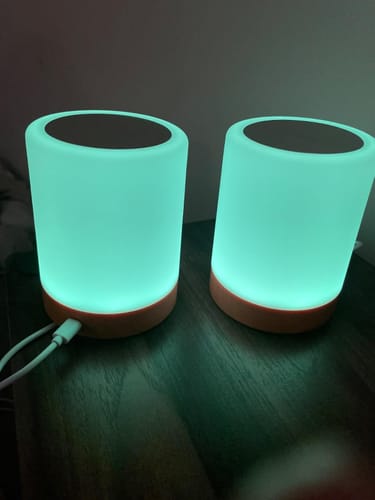
“These lamps have helped me feel less alone. I work from home and don’t have a ton of time to be social and sending these to a couple of my friends was a great idea. I love knowing when they’re thinking about me and I love tapping the lamp so they know I’m thinking about them as well!”
Frequently Asked Questions
Does the Friendship Lamp work between the UK and other countries?
Yes. As long as both lamps are plugged in and connected to Wi-Fi, they'll communicate regardless of distance. UK to Australia, UK to the US, UK to anywhere — it makes no difference to the lamp.
Do both people need to have the app installed?
Yes, the LuvLink app is needed during setup to connect each lamp to Wi-Fi and link it to a group. Once everything's configured, day-to-day use requires no app interaction at all — just touch the lamp.
Can I add more lamps to my group later?
Absolutely. If you start with a Set of Two and later want to include a parent or sibling, you can add a Single Lamp and connect it to your existing group using the same group code.
What Wi-Fi do I need for the Friendship Lamp?
A standard 2.4GHz Wi-Fi connection. Most UK home broadband routers support this — it's the same band used by many smart home devices. If your router is a newer mesh system that combines both bands under one name, you may need to split them temporarily during setup. The app will walk you through it.


